Ziber Api explanation
Short explanation for someone who is going to test
Ziber Wordpress Plugin
- In the attachment, the plugin that you can upload in your Wordpress environment
- You get a Ziber button, where you can enter an API key (you get it from Ziber Team)
- You can also use the staging or test environment there, but it is better to leave this empty, then the production environment will be used
- In Wordpress you will then have access to News and Activities that you publish from Ziber Team to your Ziber Api (takes max 10 minutes for the messages to appear
The Ziber API - output
- In principle you can also view the Api output via https://api.ziber.eu/ but, because you don't really need that via the Wordpress plugin we made.
- To do a basic test if everything works:
go to https://api.ziber.eu/swagger/index.html
Click on "Authorize" and enter the API key here. Then click on "authorize" in the modal
Close the modal
Click (for example) on the block: /api/v1/news
Click on Try it out
Click on Execute
You will then see the response from the API (under the text Server response )
Ziber Team – Settings API
- In Ziber Team you can set the Ziber Api output and get the API key (which you have to enter in Wordpress for verification at the Ziber Plugin)
Ziber Team – publish messages/activities
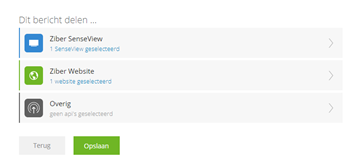
- When you publish a news item/activity from Ziber Team, you get the option at the bottom of the screen to check the Ziber Api,… so that the message/activity is published to the Ziber Api (and within 10 minutes it will appear in Wordpress):