Enable and set up absence notifications
If the school/daycare wants to use the 'absence notifications' function, the school/daycare must activate the function via Ziber Team. Here you can choose which options the parent has when reporting his/her child absent.
Enable absences
If you have the administration and/or management role, you can go to 'Parents' from the Ziber Team Dashboard to enable or disable absences. You will see a button 'Absence settings' there. You will then see the following screen:
Please note: The settings you make here apply to the entire organization.
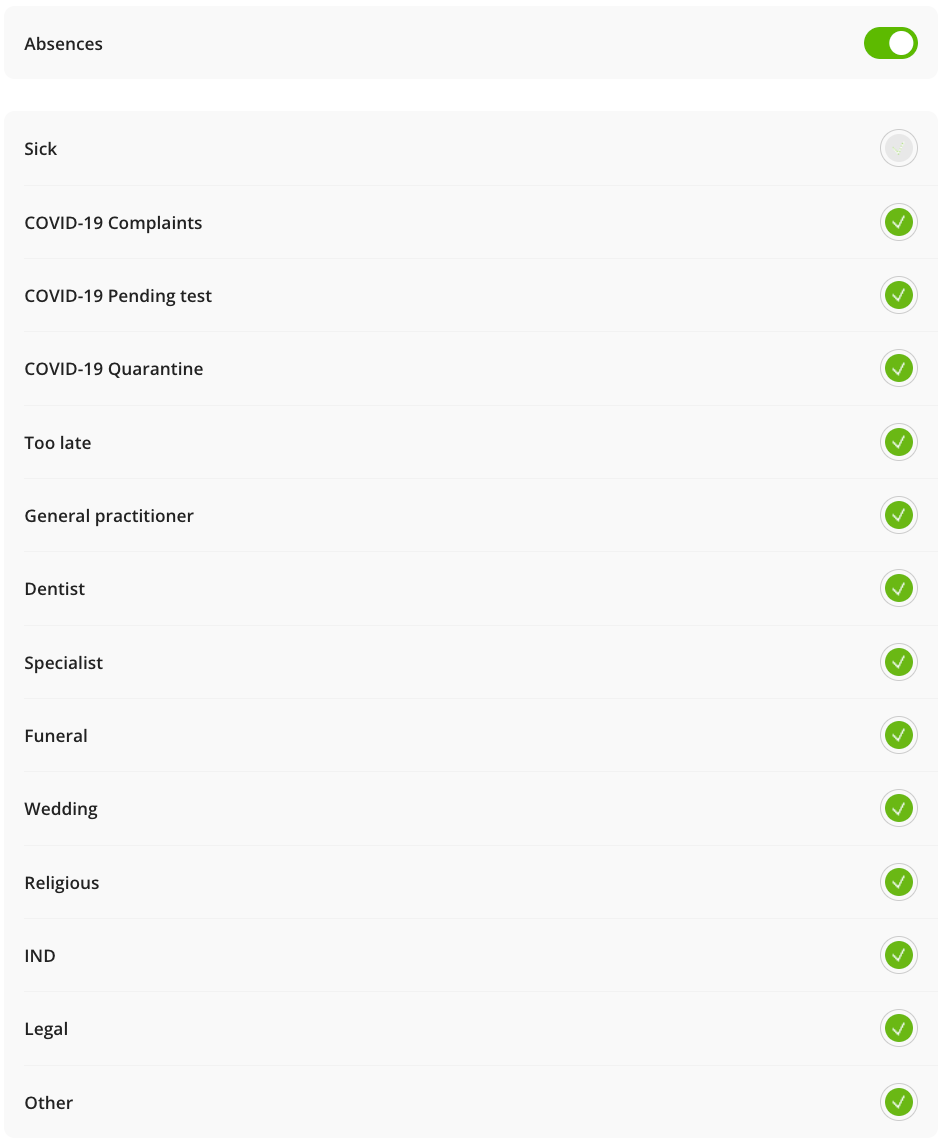
There you first determine at the top whether you want to use the option for parents to report absences via the app (by checking the top box).
Then you indicate below which possible reasons for absence you want to have off or on.
You can choose from the following reasons for absence:
| Sick | |
| Too late | |
| GP | |
| Dentist | |
| Specialist | |
| Funeral | |
| Wedding | |
| Religious | |
| IND | |
| Legal |
Please note: When you have the absence option 'on', you cannot turn off the 'Sick' option
Note required in case of absence
It is also possible to make it mandatory for parents to fill in a comment/explanation for the absence. You can do this by checking the option 'Comment mandatory' at the bottom.
Tip: Parents will see in the comment field of the absence notification that a comment is required, they will then see: 'A comment is required'