Shop settings - add and set a discount code
With a discount code you give the customers of your webshop a discount on the purchase of their products. This discount (percentage) is calculated over the total amount of products in the shopping cart. The discount is not calculated on any costs of payment and shipping methods.
- The discount percentage is only calculated on the product total (excluding shipping and payment costs).
- The discount percentage may only contain whole numbers.
- The discount code may be used indefinitely within the promotional period.
- The code and the discount percentage cannot be changed after an order has been completed.
Set up a discount code
From the main menu in Ziber Team, go to Shop Orders > Settings. Then click on the Order overview tab.
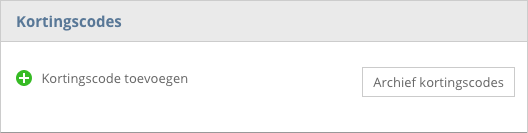
- Select 'Add discount code'
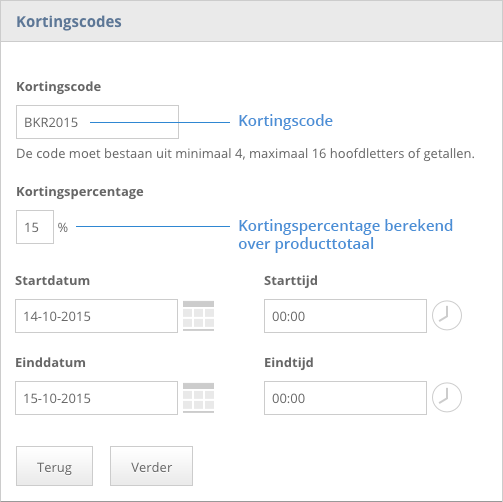
- Enter a discount code.
- Enter a discount percentage (whole numbers only).
- Choose a start and end date.
- Click on continue.
Change a discount code
If a discount code has not yet been used, you can adjust all settings; code, percentage and date.
When a discount code has been used, you can only change the date.
Overview discount codes
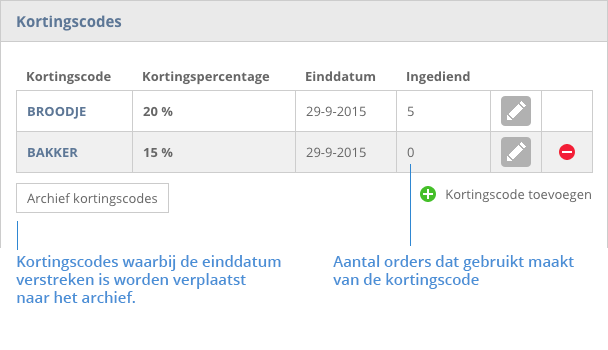
In the overview you will find all active discount codes (end date not yet reached).
Expired discount codes (archive)
When a discount code has expired, it will be moved to the archive. Here you will find an overview of all expired discount codes.
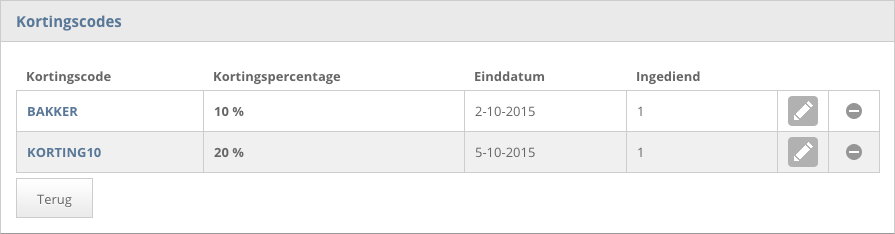
You can change the expiry date of an expired discount code to a date in the future. This makes the discount code active again. Click on the edit icon (pencil) to change the discount code.