Themes: add, customize and link
Using various themes in the website
You can expand the design of the website with multiple themes, so that you can give the website a different look & feel on different pages. The parts you can change in a theme are:
- background image of the template
- animation headers
- background (color and image)
- design layers
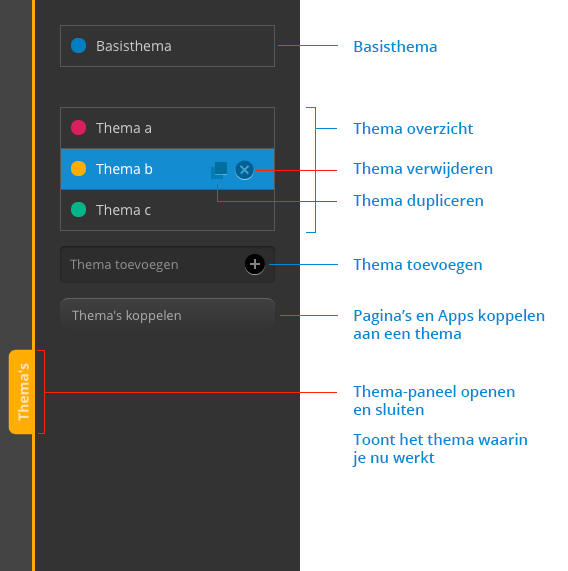
Add a theme
- Click the 'Themes' button in the settings screen.
- The theme panel slides open.
- Click on 'Add theme'
- A theme will be added immediately called 'Theme A'
- Click on 'Theme A' in the theme overview
- 'Theme A' will be activated and the theme panel will close automatically
Customize the theme
- In the theme overview, select the theme you want to customize
The theme panel closes automatically after selecting a theme - Customize the items you want to change in the theme.
Link the theme to a page or app
Once you have created a theme, it is not yet linked to a page or app. You can link a theme to one or more pages or apps so that it becomes visible on the relevant page or app.
- Open the Themes panel
- Click on 'Link themes'
The pairing screen will open - At the page or app where you want to change the theme, click on the name of the theme (for example, Basic theme) and choose the desired theme from the menu.
- Click on 'Link themes' again to close the screen.
Rename the theme
- In the theme panel, select the theme you want to rename.
At the bottom of the settings screen is the name of the theme in large letters - Click on the name of the theme
The text changes into an input field - Change the theme name
- Click once outside the input field (or on enter) to save the name
Duplicate a theme
If you want to create a theme that is very similar to another theme, you can make a copy of a theme.
- Open the theme panel
- Mouse over the theme you want a copy of
- Click on the duplicate icon (see figure 1)
By default, the copy will be named after the copied theme with the word "copy" after it.
Delete a theme
- Open the theme panel
- Mouse over the theme you want to remove
- Click on the delete icon
Any pages or apps linked to the theme will be linked back to the base theme
Set a custom height for the animation header
It is possible to vary the height of the header for each theme.
- In DS4, go to the theme in which you want to adjust the header height
- Click on 'Animation headers'
- Upload (if not already done) header images
- At 'Height', uncheck the 'Auto' box
- Enter the desired value (pixels)
