Manage payment links
When you click on the 'Ziber Pay' tile from the main menu of Ziber Team, you will arrive at the screen where you can manage all payment links. You can also enter new payment links from this screen (via the green button at the top right of 'New payment link'.
Watch the video explanation
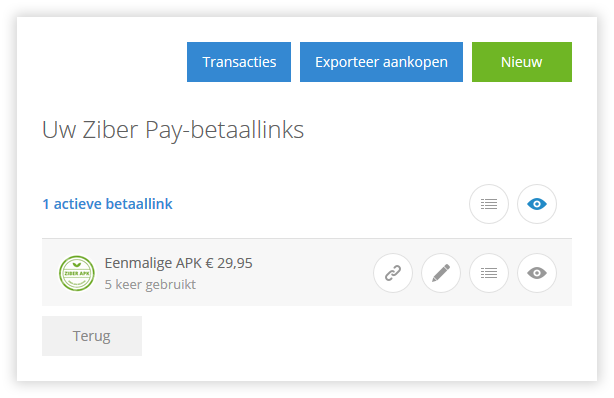
Your Ziber Pay payment links
This is where you manage your payment links. You can do the following per payment link:
Copy payment link to clipboard With the 'link' icon you make a copy of this link to your clipboard. You can then share this link to make your customers pay for this payment link.
Change your payment link With the 'change' icon (the pencil) you can adjust all settings of this payment link. View here which settings you can make per payment link .
View all purchases from a payment link With the 'purchases' icon (the dashes) you can view all purchases from this payment link. Read more about viewing the purchases here .
Hide your payment link With the 'hide' icon (the eye) you make a payment link invisible. This payment link can then no longer be used (payment link is no longer available).
Above the overview of the payment links you can see how many payment links there are (on the left in the picture) and you can filter on payment links with purchases by means of the 'purchase' icon (the bars) at the top right (click on the icon - the bars then turn blue - to filter). You can also filter with the 'hide' icon (the eye) on only the active payment link or also the hidden payment links (click on the icon - the eye then turns blue - to filter).
You can also export the transactions from this screen. Read more about exporting Ziber Pay transactions here .